
As the guardians of their community’s well-being, HOA and condominium boards face a dual mandate: keep common areas in top shape and manage maintenance costs responsibly. Yet, all too often, maintenance calendars are buried in spreadsheets, repair requests get lost in inboxes, and breakdowns escalate into crises. Without proper Maintenance Management, this scenario can result in frustrated residents due to the creaky elevators, overgrown landscaping, or unlit walkways, and stressed board members scrambling to react instead of planning.
Thinking of this, we have just launched the Maintenance Management feature, now live on Neigbrs by Vinteum, to end that cycle. This tool was carefully designed as a calendar‑driven tool that helps boards plan, assign, track, and register every upkeep task, all from a single dashboard. In this article, we explore the fundamentals of proactive maintenance, common pitfalls that lead to reactive chaos, and how Neigbrs’ new update can be the friendly, reliable partner that transforms how communities care for their shared spaces.
Jump here
Why Proactive Maintenance Matters
Imagine a summer afternoon when an air-conditioning unit in your clubhouse fails. In a reactive model, the board might receive a late-night email, scramble to find a technician, and scramble the next morning to notify residents that the pool lounge is closed. In contrast, with proactive scheduling and regular inspections, the same unit would have received its semi-annual checkup weeks earlier, avoiding downtime, saving money (emergency repair premiums), and keeping residents comfortable.
Proactive maintenance not only reduces stress but it also:
- Extends the assets’ lifespan: timely servicing prevents small issues from cascading into major failures.
- Controls costs: planned budgets outperform unexpected expenses, which often carry rush premiums. When planning and nurturing a reserve fund, for example, you’ll always have an emergency budget that will help maintain the community’s financial health.
- Boosts resident satisfaction: reliable amenities build confidence in leadership and foster a sense of community pride, in addition to maintaining property value.
Common Maintenance Challenges Boards Face
Before diving into solutions, it’s helpful to acknowledge the typical obstacles to better deal with them.
- Confusing request channels
Residents routinely wonder, “Who do I even contact about the broken gutter?” Without a centralized system, requests often vanish into inbox black holes. On top of that, residents may contact board members directly, making it harder to track issues, and overwhelming for everyone involved. - Lack of visibility
Boards juggling spreadsheets and scattered text chains often lose track of deadlines and priorities. Unsure who to contact or buried under contractor emails and estimates, they may see even small repairs drag on for months, frustrating residents along the way. - Budget overruns
Without a clear record of past work, costs, and vendors, even minor repairs can quickly spiral out of control. This often leads to dipping into reserves, or worse, using operating funds. And when budgets run dry, homeowners end up footing the bill through special assessments.
Read more about the difference between operating and reserve funds here. - Communication breakdowns
If you’ve ever been a resident before becoming a board member, you’ve likely wondered, “What is the board even doing?” Now, on the other side, you know it’s practically a full-time job. But if that effort isn’t visible, how would residents know? Without tracking and reporting maintenance updates, even major improvements can go unnoticed, and poor feedback loops can quickly lead to a loss of trust.
Best Practices for an Effective HOA Maintenance
1. Create a ‘Living’ Maintenance Plan
Rather than a static document buried in bylaws, a “living” roadmap evolves with the community’s needs and keeps them up to date. You might start by:
- Inventory key assets: list HVAC units, roofing sections, walkways, and pool filters, for example, each with an estimated service life.
- Map inspection intervals: define clear intervals, monthly gutter checks, quarterly HVAC filter changes, and annual roof reviews. In this situation, conducting a reserve study would be highly beneficial, as it includes the expertise of a professional who can perform inspections.
- Assign clear ownership: Designate a maintenance lead or committee member for each asset category.
Tip: Review and adjust this plan at every quarterly board meeting, ensuring that unforeseen issues (like rising vendor costs) are factored in promptly.
Extra tip: Download our Preventive Maintenance Kit for free below.

2. Centralize work-order intake
Even if you are in a small community, eliminate confusion with a single digital portal for maintenance requests. Whether a resident reports a flickering hallway light or a cracked sidewalk, every request should:
- Generate a unique ticket number
- Record who reported it and when
- Automatically notify the assigned board member or manager
Neigbrs’ resident portal streamlines this process: requests created by residents appear instantly in the Maintenance Management calendar, complete with priority coding. To explore the platform, you can get a free demo here and schedule a walkthrough.
3. Leverage Data for Smarter Prioritization
Not all tasks carry equal urgency. Use historical data, frequency of past repairs, safety impact, and resident feedback to guide decision-making. For example:
- Safety first: Loose handrails or uneven sidewalks rank highest.
- High-traffic areas: as pool areas and clubhouse entries, wear out faster—schedule more frequent inspections.
- Seasonal shifts: In Florida, hurricane season requires roof and drainage checks before June.
With Neigbrs, interactive dashboards highlight overdue tasks and cost trends, enabling boards to allocate budgets where they’ll deliver the greatest return.
Deep Dive: Neigbrs Maintenance Management in Action
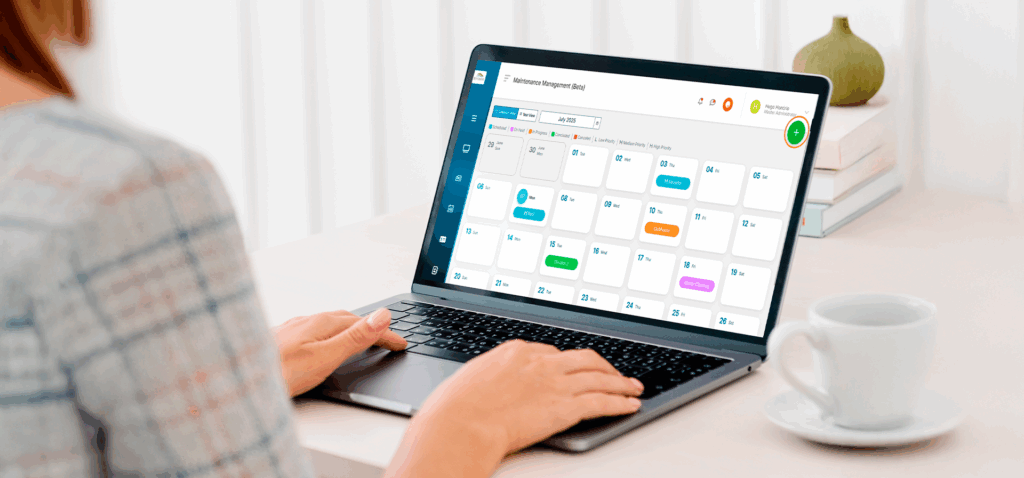
If you’ve ever tried to organize HOA maintenance with a mix of spreadsheets, emails, and calendar reminders, you know how messy things can get. That’s exactly why Neigbrs’ new Maintenance Management feature was created, to bring more structure, visibility, and accountability to community maintenance.
This tool is designed to support the way real boards work, with thoughtful touches that make organizing, tracking, and improving maintenance tasks easier for everyone involved.
A Clear Calendar View (So Nothing Slips Through)
When you open the Maintenance Management feature, the first thing you’ll notice is the clean, calendar-based layout. By default, tasks are displayed by month, but you can switch to a year view to see upcoming maintenance across the whole year.
Each task appears with a status color:
- Blue for Scheduled;
- Orange for In Progress;
- Purple for On Hold;
- Red for Canceled.
Plus a letter code showing priority:
- L for Low;
- M for Medium;
- H for High.
This visual system enables boards to quickly scan upcoming items and identify those that require attention, eliminating the need to dig through notes or message threads.
Easy Task Creation and Categorization
Adding a new task is a simple process that takes just a few clicks. You’ll fill out a short form where you can:
- Create a Name for your maintenance;
- Set the date or define a broader range for longer projects;
- Choose a category, such as Preventive, Corrective, Predictive Maintenance, or type your own;
- Assign a status and priority level to help organize workflows;
- Add a detailed description (with formatting options and even image uploads);
- Attach documents like vendor quotes, receipts, or maintenance checklists.
This means every task has all its context, files, and history in one place, and future board members can easily understand past work.
Assigning and Tracking Tasks
Each maintenance task can be assigned directly to a board member, manager, administrator or representative. This avoids the classic “who was supposed to handle that?” scenario. You can also add the name of the service provider, like a landscaping company or repair contractor, and update costs as the work progresses.
Everything is saved automatically into a traceable history, so you always have a record of who did what, when, and how much it cost.
Built-In Reminders (So You’re Not Chasing Deadlines)
If you’ve ever forgotten to follow up with a vendor or scrambled to remember what was scheduled for next week, you’ll appreciate this feature: you can set automatic reminders for yourself or others on the board. These can be sent the day of the task or ahead of time, giving everyone the necessary heads-up.
Even for small communities, this kind of structure brings a sense of ease and professionalism to ongoing maintenance work.
Designed for Boards, Not Residents
To clarify, Maintenance Management is intended for internal use. That means only Master Administrators, Administrators, and Representatives can access this section. Residents won’t see these tasks in their portal.
But if there’s a need to keep residents in the loop, like if pool repairs will temporarily close access, you can also use Neigbrs Notices (available for every Neigbrs client) feature to send a quick email, text, or push notification. It’s a great way to stay transparent without overloading your board’s to-do list.

Final Thoughts
Maintenance management need not be a constant scramble. By adopting proactive best practices, backed by a platform like Neigbrs, your board can transform upkeep into a strategic advantage. Clear tasks, data-informed prioritization, and transparent resident communication build trust, extend asset lifespans, and stabilize budgets.
If you want to elevate your community’s maintenance operations, schedule your free demo today and see how Neigbrs turns complex workflows into clear, actionable steps, so boards and residents alike can enjoy well-maintained, thriving communities.