

Every day, technology becomes a bigger part of our lives. When it comes to HOA Management, boards now face pressure to modernize their operations. With a rapidly evolving landscape, especially in states like Florida, where legal requirements are tightening and favoring technological environments.
In these modern times, traditional, paper-based processes just won’t cut it anymore. On the other hand, embracing digital solutions, such as cloud-based data storage and communication channels, allows managers to streamline operations, keep records safe and easy to share, and reduce administrative headaches.
But if you’re still operating in the analog era, don’t worry. In this guide, we’ll share a step-by-step roadmap for going digital in just 30 days, with actionable tips to help associations make a smooth transition.
The Benefits of Going Digital in HOA Management
The traditional methods of managing HOA operations, relying on paper records, manual processes, and fragmented communication, are becoming more inefficient and prone to errors. In today’s world, residents expect transparency and immediate access to information.
Moreover, evolving state laws, such as the Florida HOA Website Law, the Open Meeting Act, and the Electronic Voting Act, require associations to maintain digital records and provide accessible communication channels to their members. However, this legal shift isn’t just about compliance but using technology as an ally, facilitating board members’ routines, and meeting the expectations of a modern, engaged community.
The communities that successfully transition to digital platforms not only experience a significant boost in operational efficiency but certainly reduce stress, headaches and lawsuits by creating a true relationship with residents.
The ability to manage finances seamlessly, share updates instantly, and store documents securely contributes to a more harmonious and transparent community. The cherry on top of the cake is that boards have more free time to focus on strategic decisions as they digitize records and automate routine tasks.
Adopting digital transformation offers numerous benefits that go beyond mere compliance, as we mentioned before. Below are some of the key advantages for you to reflect on.
Enhanced Communication
Digital platforms, such as Neigbrs, allow associations to communicate with residents through multiple channels—email, SMS, push notifications, in-app alerts, chat, and even Smart Calls for residents who are not technologically familiar. This multi-channel approach ensures that important information reaches everyone promptly, fostering a sense of community and being vital during disasters such as hurricanes.
Streamlined Record-Keeping
Electronic document storage simplifies record management. Everything from meeting minutes to financial statements can be securely stored and easily accessed, ensuring compliance with legal mandates and making audits less daunting.
Efficient Financial Management
With integrations like QuickBooks, financial operations such as invoicing, budgeting, and expense tracking become more accurate and less time-consuming. This integration helps reduce errors and provides the board with real-time financial insights.
Custom Community Portal
In some states, including Florida, HOAs with 100 or more parcels are required to maintain a community website and resident portal, extending the rule to +25 units in 2026.
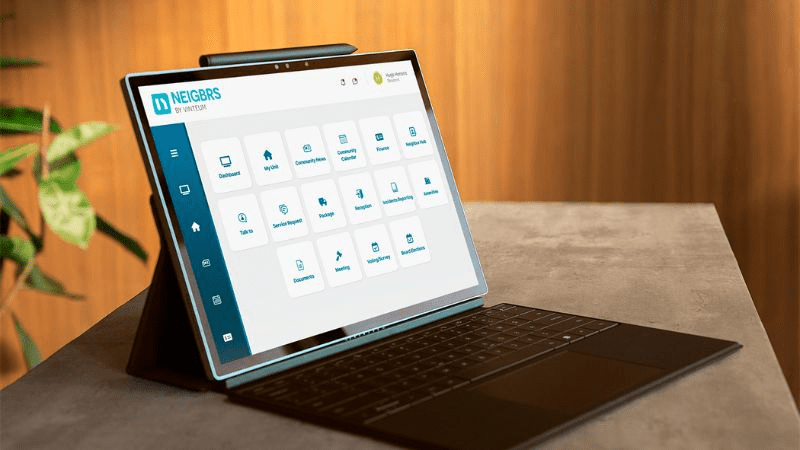
This highlights the need to keep residents informed, but it goes much further by also protecting the board when documents, updates, and other relevant information are shared properly. As we know, creating a website and a resident portal is not that easy. That is why Neigbrs by Vinteum also allows associations to create a tailored online presence, all in one place.
Improved Resident Trust and Engagement
Digital solutions empower residents by providing instant access to information, easy ways to submit feedback, and transparent channels for raising concerns. This active engagement builds trust and strengthens community bonds, saving boards time and reducing stress.
A 30-Day Roadmap to Digital Transformation
We know that transitioning to a digital platform might seem overwhelming, but with a clear plan, it can be accomplished fast. Here’s a week-by-week guide to help associations make a smooth and efficient transition from paper to digital in 30 days:
Week 1: Assessment and Planning
| Evaluate Current Processes | Begin by reviewing all current management tasks. Identify areas where paper-based systems slow you down, such as record-keeping, resident communications, and financial reporting. |
| Set Clear Objectives | Define what your digital transition should achieve. Is it faster communication, easier document access, or improved financial tracking? Write these goals down. |
| Involve Key Stakeholders | Compile a digital record of all residents, including phone numbers, email addresses, their units, and emergency contacts. Highlight residents with medical licenses or special equipment as a useful sidenote for emergencies. You can use a simple spreadsheet or a CRM tool. |
| Organize a Dedicated Email Account | Set up a separate email account exclusively for community matters; if needed, create dedicated accounts for each board member. This ensures that communications remain organized and professional. |
| Establish a Communication Email List | Gather all resident emails into a mailing list. This list will be used to send updates, notices, and emergency communications. If you don’t use a CRM, create a simple spreadsheet or docs where you can copy and paste the email list to simplify the processes. |
Week 2: Research and Platform Selection
| Evaluate Current Processes | Research HOA management software that covers your needs. Look for features like resident databases, document storage, and communication channels. Tip: Platforms like Neigbrs not only provide comprehensive management tools but also integrate seamlessly with QuickBooks for financial management. |
| Check Compliance and Security Features | Ensure that the chosen platform meets legal requirements (such as those in Florida) and has robust security measures. Look for cloud-based solutions that offer encrypted storage for sensitive documents. |
| Review Third-Party Tools | If you don’t feel ready for an exclusive HOA platform, you might also use tools like Google Drive for document storage, mailing platforms like Mailchimp for resident communication, and Wix or WordPress to create a community website. |
| Request Demos and Consult Reviews | Schedule demos with your top choices. Ask about integration options, data migration assistance, and user support to ensure the platform fits your community’s needs. |
Week 3: Data Storage Maintenance and Communication Channels
| Migrate Your Records | Transfer all your current documents, records, and resident information to the new digital platform. This may include financial records, meeting minutes, and maintenance logs.Tip: Use tools like Google Drive or Dropbox for backup during the transition process. |
| Create Communication Channels | Establish your multi-channel communication system. • Set up email notifications (using your dedicated community email). • Configuring SMS alerts if needed. • Create a newsletter to share important updates and upcoming events. • Optionally, setting up a community chat feature for instant messaging. |
| Organize Digital Documents | Create a systematic structure for storing files. Organize folders by categories such as financial documents, meeting records, legal documents, and maintenance logs. This organization will simplify record retrieval and ensure compliance with state regulations. |
Week 4: Training, Launch, and Feedback
| Educate Your Team and Residents | Conduct training sessions for board members and staff if needed. Provide clear tutorials or video guides on how to use the new features. Hold a meeting or an in-person session for residents to explain the benefits and functionality of the digital system. |
| Perform a Soft Launch | Start the changes with a small group. This allows you to gather feedback and address any technical issues before the full-scale launch. |
| Official Launch | Announce the transition to the entire community. Use your established communication channels to send out an official launch notice. Make sure to provide support contacts or a FAQ section to help residents during the initial phase. |
| Gather Feedback and Adjust | Encourage board members and residents to provide feedback on the new system. Use this information to make necessary adjustments. Regular feedback will help fine-tune the digital processes for ongoing success. |
Overcoming Common Challenges
While the digital transition brings many benefits, it’s normal to encounter some challenges along the way. Below are a few of them, along with tips to overcome them.
Resistance to Change
Some residents and board members might be hesitant to adopt new technology. Address this by highlighting the tangible benefits, such as improved efficiency, transparency, and ease of access to records, and by providing robust support during the transition.
Data Security Concerns
Ensure that the chosen platform employs top-notch security measures. Encryption, secure storage, and regular backups are essential to protect sensitive information.
Training Gaps
Not everyone is tech-savvy, especially elderly people. Invest in comprehensive training and ensure help is readily available. Consider appointing a digital transition champion within the community who can assist others and share best practices.
Building a Resilient Community
The bigger picture within digital transformation isn’t just about technology; it’s about creating a more connected and resilient community. By simplifying workflows and fostering transparency, HOAs can foster greater trust among residents. When everyone has easy access to important documents, updates, and financial records, it builds confidence in the board’s decisions and leads to more active participation.
Residents appreciate when their community operates with clarity and efficiency. In turn, this engagement can lead to more collaborative decision-making and a stronger sense of belonging. By adopting digital solutions like Neigbrs, communities not only meet legal requirements but also create a foundation for long-term success.
How Neigbrs by Vinteum Can Make a Difference
We understand that transitioning to a digital platform is a significant step. That’s why we at Vinteum developed Neigbrs to be a one-stop solution that meets all your HOA management needs. Here’s how we can help:
- Robust Communication Tools: Our platform includes five dedicated communication channels, which are email, SMS, push notifications, in-app alerts, and chat. These tools ensure that every member of your community stays informed and engaged, especially during critical times.
- Seamless QuickBooks Integration: Neigbrs integrates effortlessly with QuickBooks, allowing you to manage invoices, track budgets, and handle financial reporting with ease. This feature minimizes errors and saves valuable time.
- Secure Document Storage: Digital record-keeping is not just about efficiency; it’s also about compliance. Our secure storage solutions ensure that all documents, from meeting minutes to financial statements, are safely archived and easily accessible.
- Custom Community Portal: Create a branded, user-friendly portal that meets legal requirements and keeps residents up to date with the latest community news and documents. This portal can be tailored to reflect your community’s identity and needs.
- Streamlined Operations: By integrating multiple functions into a single platform, Neigbrs reduces your board’s administrative burden, freeing up time to focus on strategic initiatives and community improvement.
We know that transitioning to a digital platform might seem daunting, but seeing is believing. Now is the time to experience a seamless, secure, and efficient way to manage your HOA or condo operations.
Schedule a free demo today and discover how Neigbrs can transform your community management process!

Frequently Asked Questions (FAQ)
Will going digital save the board money?
Yes. Think about the costs of printing, envelopes, and postage for every single notice or ballot. When you move these to email or app notifications, those costs drop to almost zero. Beyond the money, you save hours of volunteer time that board members used to spend stuffing envelopes.
Is digital voting legal in every state?
Depends on where your community is located. For example, Florida has specific requirements under the Electronic Voting Act. You should check your state statutes and your own bylaws before making the switch. Most modern platforms are built to follow these laws, but a quick chat with your association attorney helps prevent any legal hiccups later.
How do we keep our community data safe?
Security is of the utmost importance when handling sensitive resident information. We suggest using cloud-based platforms that use encryption and regular backups. Avoid keeping social security numbers or private medical data unless it is absolutely necessary for emergencies. When you choose a platform, ask them specifically where they store your data and who has access to it.
How to deal with non-tech-savvy residents?
We know that change feels hard, especially for neighbors who prefer paper. You can bridge this gap by offering “Smart Calls” or automated voice messages. This allows residents to receive community updates through a simple phone call. We’ve seen boards succeed by hosting a quick “tech coffee hour” at the clubhouse to show everyone how the new portal works.
Final Thoughts on The Future Of HOA Management
Transitioning to a digital platform is an essential step for modern HOA and condo management. With our 30-day roadmap, communities can take gradual yet decisive steps toward embracing technology that enhances communication, streamlines processes, and ensures legal compliance.
We invite HOAs and condo boards to join the digital revolution. By taking the leap and transitioning to a digital platform, you’re not just updating your processes—you’re investing in your community’s future!